Cloning a repository
About cloning a repository
When you create a repository on GitHub.com, it exists as a remote repository. You can clone your repository to create a local copy on your computer and sync between the two locations.
About cloning a repository
You can clone a repository from GitHub.com to your local computer to make it easier to fix merge conflicts, add or remove files, and push larger commits.
When you clone a repository, you copy the repository from GitHub.com to your local machine.
Move back to the original repository, and click the green "Code" button to get the URL to clone:
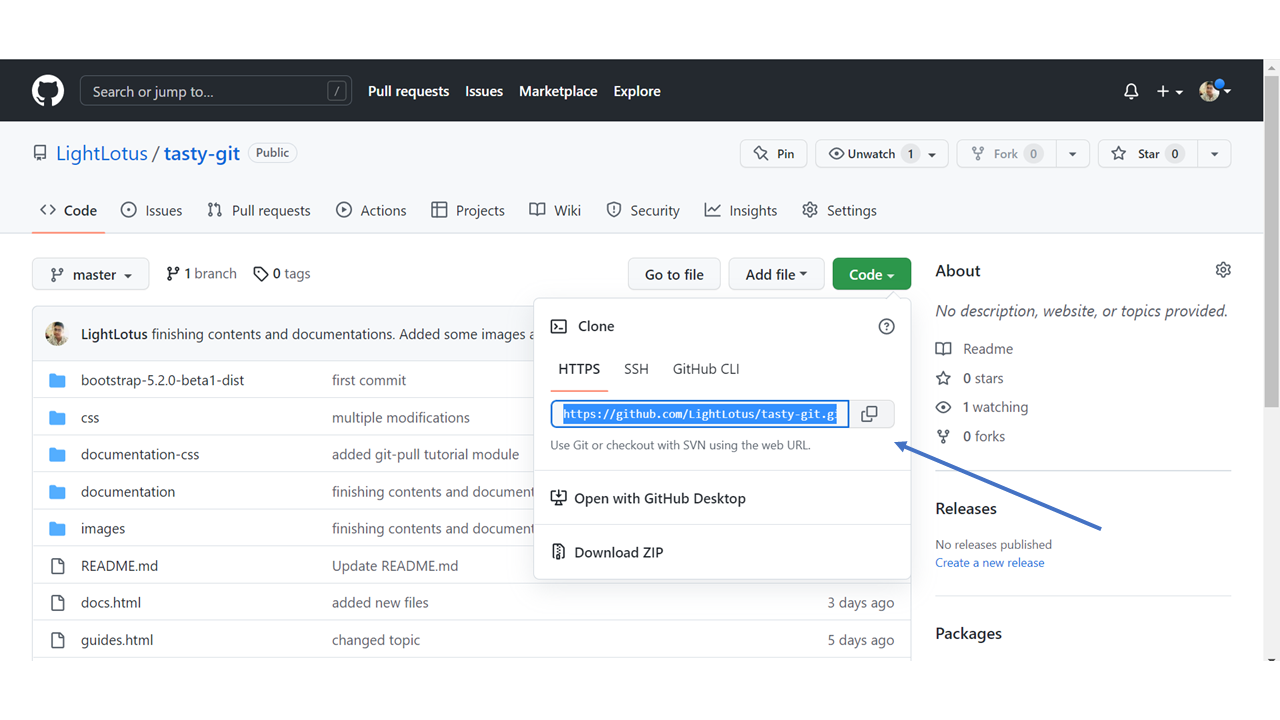
Open your Git bash and clone the repository:
Cloning into 'tasty-git.github.io'...
remote: Enumerating objects: 33, done.
remote: Counting objects: 100% (33/33), done.
remote: Compressing objects: 100% (15/15), done.
remote: Total 33 (delta 18), reused 33 (delta 18), pack-reused 0
Receiving objects: 100% (33/33), 94.79 KiB | 3.16 MiB/s, done.
Resolving deltas: 100% (18/18), done.
Take a look in your file system, and you will see a new directory named after the cloned project:
tasty-git.github.io/